About BTCC
- 1How to Trade Crypto Futures Contracts on BTCC
- 2How to Use BTCC Bonus to Trade: A Beginner’s Guide to Risk-Free Crypto Trading
- 3How to Deposit and Withdraw Crypto on BTCC
- 4About BTCC Fees – A Beginner’s Guide (2026 Updated)
- 5How to Buy USDT on BTCC — Beginner’s Step-by-Step Guide
- 6How Does BTCC Work?
- 7About BTCC 0-Fee Campaign: A Complete Guide to Eliminating Crypto & TradFi Trading Costs
- 8How to Trade Crypto with BTCC on TradingView
- 9How to Withdraw Crypto on BTCC
- 10BTCC Demo Trading Guide (2026): How to Practice Crypto Futures Trading Risk-Free
- 11BTCC Referral Code "1Z1OTN" for June 2026
- 12BTCC Review 2026: Best Crypto Futures Exchange
- 13How to Register an Account on BTCC
- 14How to Deposit Crypto on BTCC
- 15BTCC Crypto Leverage Trading Guide 2026
- 16BTCC Deposit Bonus & Campaign in 2026
- 17How to Login BTCC Account in 2026: Step-by-Step Guide for Beginners
- 18How to Trade on BTCC in the US: Step-by-Step Guide for Beginners
- 19Is BTCC Available in the USA? (July 2026 Updated Guide)
- 20BTCC App Review 2026: Is It Safe and Legit?
How to Login BTCC Account in 2026: Step-by-Step Guide for Beginners


How to Login to a BTCC Account
1. Web Login (Desktop/Browser)
Step 1: Open the BTCC Login Page

The first thing you need to do is go to the official BTCC login site in a browser. On a computer, go to the BTCC homepage and click the “Login” button in the top right corner. Open the BTCC app on your phone and tap “Login” on the home screen.
Use the official platform instead of a link from a third party. Fake login pages are still one of the biggest security threats in crypto, especially when the market is really active. BTCC says you should only log in through its official website or app.
For direct access, use: BTCC Login Page
Step 2: Enter Your Registered Email or Phone Number
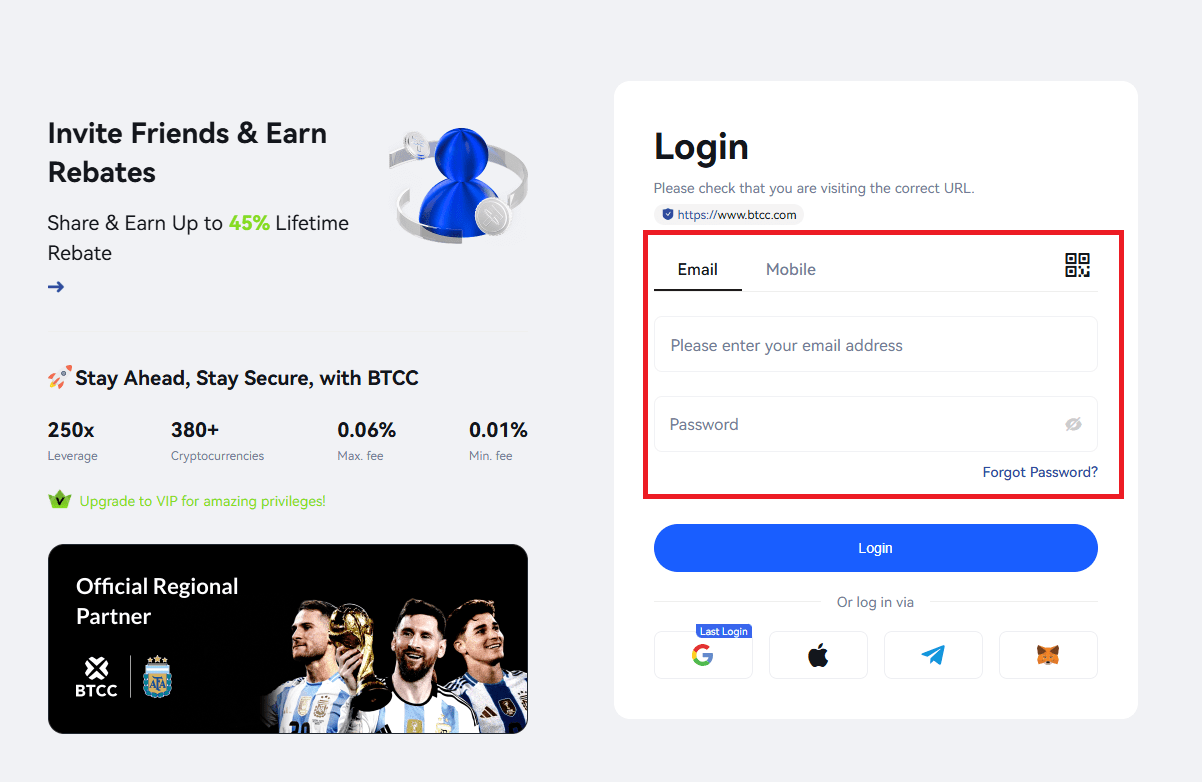
When you get to the login page, type in the email address or phone number that is linked to your BTCC account. If you signed up with an email address, don’t accidentally use a second mailbox. If you signed up with a phone number, please sure you input the right country code.
A lot of people fail to log in because they use an obsolete email address or put in a phone number with an additional zero. BTCC support says that the way you format your country code can effect how quickly SMS verification gets to you.
Step 3: Enter Your Password and Complete Security Verification
After you input your account details, type in your password and follow any other security prompts. You might need to enter the following, depending on how your account is set up:
- An SMS verification code
- An email verification code
- A Google Authenticator code
- A security puzzle or captcha
Step 4: Access Your Dashboard and Prepare for Trading
After you log in, you can see your trading dashboard, wallet balance, open positions, deposit page, and account settings.
At this point, preparing your account is frequently more significant than actually logging in for newbies. A lot of people prefer to verify their identity, set up two-factor authentication, and add money to their account before making a trade.
Making an initial deposit, trying spot or futures trading, and slowly gaining expertise with lesser position sizes are all popular first steps for beginner traders. Some people may set up their first trading account with a $200 deposit since it gives them ample room to try out different transactions without putting too much money at risk.
2. Mobile App Login (iOS & Android)
-
Open the App: Make sure you’re running the 2026 UI Update for the best speed.
-
Biometric Entry: To get quick, one-touch access, turn on FaceID or Fingerprint login in your settings.
-
Manual Login: If you haven’t set up biometrics, type in your information and the 2FA code when asked. The software is optimized for minimal latency, which makes it the best alternative for traders who need to react quickly to rapid changes in the market.
/ You can claim a welcome reward of up to 30,000 USDT🎁\
BTCC’s New Login & Dashboard Features for 2026
BTCC has made a number of improvements to make the site safer and easier to use in 2026:
-
One-Tap Social Login: Encrypted support for Apple ID and Google accounts lets you log in faster without putting your main credentials at risk.
-
Integrated Portfolio Analytics: As soon as you log in, your new dashboard shows AI-driven insights into your PnL and suggests possible hedges based on how the market is currently moving.
-
30,000 USDT Reward Track: If you’re a new member and you log in with the code 1Z1OTN, you can see how close you are to getting a 30,000 USDT Welcome Bonus. Check your “Task Center” every day to get more trading credits.
Exclusive AFA Partnership Rewards After Login
This month, logging in will provide you access to exceptional global benefits thanks to BTCC’s status as the Official Regional Partner of the Argentine Football Association (AFA).
-
AFA Legendary Lucky Draw: Once logged in, navigate to the “Benefit Center.” Between April 2 and April 15, you can enter the draw to win signed jerseys from Lionel Messi, Julián Álvarez, and Alexis Mac Allister.
-
Trading Championship: Active traders who join in during this time can take part in the AFA-themed competition, which has a prize pool of millions of USDT and limited-edition co-branded items.
Advanced Security: Protecting Your Account in 2026
Account security is very important as crypto marketplaces become more institutional. These are the rules that professional traders on BTCC must follow:
-
Google Authenticator over SMS: SMS is at risk of SIM-swap attacks. Google Authenticator gives you a 6-digit code that is linked with the time and is more tougher to steal.
-
Check Login History: Go to the “Security” tab often to see which sessions are still open. You can “Log Out of All Devices” with one click if you see an IP address you don’t recognize.
-
URL Verification: Always make sure you are on the official BTCC domain. In 2026, phishing efforts have gotten smarter and frequently completely copy the design of the exchange.
BTCC Login Not Working? Common Problems and Fixes
| Issue | Quick Fix |
| No SMS Code Received | Ensure the country code is correct and remove any leading zeros from the phone number. |
| 2FA Code Invalid | Sync your device time. In Google Authenticator settings, select “Time correction for codes” to resync with BTCC’s servers. |
| Account Locked | For your protection, accounts lock after 5 failed attempts. Wait 24 hours or contact [email protected] for manual verification. |
| Forgotten Password | Click “Forgot Password?” on the login screen to trigger a reset via your verified email or phone. |
Conclusion
In 2026, getting into your BTCC account will be easy. What makes great traders stand out from the others is that they stick to a safe routine. You are not simply managing a portfolio when you enable 2FA and stay active during the BTCC x AFA relationship. You are also taking part in a worldwide financial legacy.