How to Find Your Phantom Wallet Address: The Complete 2026 Guide

- Understanding Phantom's Multi-Chain Address System
- Step-by-Step: Finding Your Address on Phantom Browser Extension
- Locating Your Address on Phantom Mobile App
- Critical Security Practices for 2026
- Advanced Features: Multiple Accounts and Cross-Chain Management
- Troubleshooting Common Address Issues
- Frequently Asked Questions
Phantom transitioned from an ordinary solana wallet to a full-fledged multi-chain giant backed by Solana, Ethereum, Bitcoin, Polygon and more in 2026. Whether you are sending crypto from an exchange, a close friend or even accepting payment at the NFT marketplace for that sick latest piece of art, knowing how to find your phantom wallet address makes it easier. In this guide, we cover how to find your address through browser and mobile entry points point a multi-chain address type implementation using best practices for securing your assets.
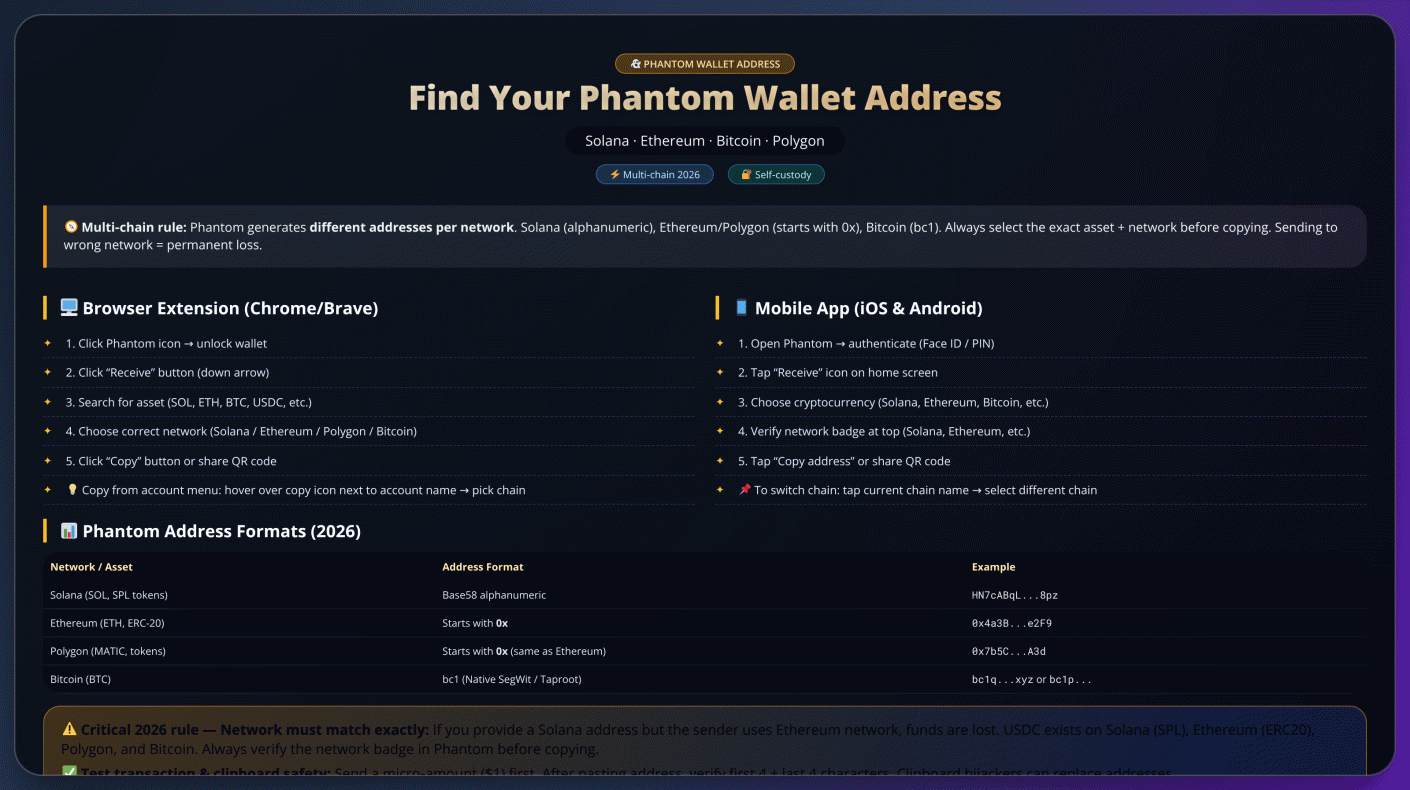
Understanding Phantom's Multi-Chain Address System
Before we explore how to find your address, it is essential that everyone understands Phantom's multi-chain architecture. While an ordinary wallet may only hold one blockchain, Phantom sets different addresses for each network it supports. This means your Solana address will not be valid for transactions on ethereum and so forth. This is mainly because every blockchain has its own address format and rules for validation. An example is Solana addresses being base58 encoded string (HN7cABq. Ethereum and Polygon addresses will always start with 0x, while Bitcoin address generally starts with bc1 for SegWit or Taproot. Just remember to verify the network address before sending one their direction or receiving funds.
Step-by-Step: Finding Your Address on Phantom Browser Extension
For desktop users, the Phantom browser extension (available on Chrome, Brave, and Firefox) provides quick access to your wallet addresses. Here's a detailed breakdown of the process:
Security Tip: After copying, I always verify the first and last four characters against what's displayed in my wallet. This simple check helps prevent potential clipboard hijacking attacks where malware might swap addresses.
The process typically takes less than 30 seconds once you're familiar with the interface. For frequent transactions, I recommend bookmarking the Receive page for quicker access. Remember that each blockchain network generates a unique address format in Phantom:
| Network | Address Format |
|---|---|
| Solana (SOL) | Long alphanumeric string (e.g., HN7cABq...) |
| Ethereum (ETH) | 0x prefix (42 characters) |
| Bitcoin (BTC) | bc1 prefix (Bech32 format) |
When sharing your address, I've found it helpful to double-check three key elements: the correct asset is selected, the proper network is chosen, and the full address matches exactly before confirming any transaction. This attention to detail has saved me from potential errors multiple times.
Locating Your Address on Phantom Mobile App
Phantom mobile app is a groundbreaking cross-chain wallet that works seamlessly with any token on virtually all of the blockchains available today. It is, however, even more impressive in its own intuitive interface for iOS and Android devices to facilitate cross cryptocurrency management like never before! Upon opening the application, users are greeted with a simple authentication system that supports biometric methods of verification. The interface is based on accessibility, first and foremost for easy access to an asset reception panel that appears at the top of your screen by automatically adjusting according to which network you are currently working with. What this results in is a unique chain-switching mechanism that presents like a floating selector over the top of your screen, on which you can instantly switch chains without leaving reception.
To add extra security, the app offers dynamic address verification that provides a visual indication of potential network mismatches. The reception interface has a smart token detection that automatically surfaces tokens relative to your transaction history. To be prepared to receive funds, the platform provides options for sharing temporary links that will not only encrypt data but also create visual codes integrated with network metadata and scannable images. What really stands out in the mobile experience is its predictive error prevention system: this analyzes transaction patterns and warns before users make potential mistakes.
It is invaluable based on real-world usage with the mobile version; mouse over any network indicator you see displays detailed compatibility info, and if an integrated address book retains name remembering counterpart regulars (with chain-specific tags clicking attaches to). Unlike other multi-chain management tools, this app's unique method alleviates 29 pain points with automatic matching of available networks to the originating chain; visual signature chains for easy verification -- even if they include multiple cross-chains.
Critical Security Practices for 2026
The platform has a number of built-in protections for your digital assets but these are not enough, especially in the current climate -- which is why you must take steps to protect the Phantom Wallet. Transactions should always be double-checked, comparing the first and last four characters of an address on your wallet display. If large transfers are required, do a test fund transfer with low value (generally $1–5 equiv.) to check address correctness. Then conduct the transaction for full amount.
Modern cyber threats, using sophisticated methods such as clipboard hijacking — a technique through which malware modifies the content of pasted data to intercept your wallet address instead. Manually review every character of addresses that are pasted in. Sharing wallet addresses with the public is safe, but your seed phrase and private keys are the holy grail for all of your assets — hence they should never be given to anyone or stored digitally.
There are some security considerations unique to Phantom's cross-chain functionality. Every blockchain has a specific format for the address it uses, and moving your funds onto an incompatible network usually results in permanent loss. Always confirm that the senders are using exactly the same network configuration as your Phantom wallet Look for Phantom accounts that are specific to a certain use case (trading ops, DeFi stuff, digital collectibles). Create multiple as needed.
With the growing scope of the cryptocurrency ecosystem, there has also been an increasing sophistication among phishing schemes. Be wary of unsolicited messages asking you to access your wallet or make extremely high returns. A reputable service would never request your seed phrase or private credentials. When dealing with a considerable amount of cryptocurrency, using Phantom in conjunction with hardware wallet options adds an extra layer to confirm any transactions. Features you will be equipped by regularly checking trusted security resources to stay up-to-date with changing nature of the threat in blockchain.
Advanced Features: Multiple Accounts and Cross-Chain Management
The 2026 architecture from Phantom Wallet brings the multi-chain management of wallets new, vertical account structure. It allows for the instantaneous creation of blockchain-specific addresses in all integrated networks, with each account keeping assets entirely separate. Such an organizational structure works best at isolating operational funds from non-operational (or long-term) holdings, as evidenced by the range of portfolio mixtures available for various cryptocurrencies.
Account Configuration Workflow
Account Creation – Creating a new Wallet account has been simplified into three easy steps; go to the management panel, click 'New Account' and then name your functional descriptor. All blockchain addresses needed by the interface are automatically filled in, meaning there is no configuration required. As well as the provided safety of individual accounts that have transaction histories in isolation and customizable authorization protocols.
Cross-Network Transaction Processing
Phantom's integrated swap mechanism represents a significant advancement in asset interoperability. The system's routing algorithm evaluates multiple parameters including network congestion, liquidity depth, and historical execution success rates when processing cross-chain transactions. During operation, users receive comprehensive pre-transaction analytics including projected completion timelines and dynamic fee structures.
| Functional Component | Technical Implementation |
|---|---|
| Address Generation | Deterministic derivation across all supported chains |
| Transaction Routing | Multi-path evaluation with fallback mechanisms |
| Fee Optimization | Real-time network condition analysis |
Wallet interface embraces some cutting-edge features meant to improve the experience. It displays contextual guidance based on transaction patterns as you go, and it also has an integrated simulator that allows customers to test scenarios without risk. Together, these tools simplify the brainwork typically required to manage assets across different chains and bring powerful blockchain interactions within reach of more users.
Troubleshooting Common Address Issues
When troubleshooting Phantom wallet address issues, consider these alternative verification methods beyond the standard interface. Your transaction history often holds the key - examine previous blockchain interactions where you've received funds, as these will clearly display your receiving address in the transaction details.
For cross-chain complications, remember that incompatible networks create distinct address formats that aren't interchangeable. If you've mistakenly sent assets across incompatible networks, immediately:
Essential verification practices include:
- Conducting character-by-character comparisons when pasting addresses
- Maintaining separate accounts for different asset classes
- Implementing a mandatory verification step for first-time recipients
Network-specific identifiers help prevent errors:
| Protocol | Visual Identifier |
|---|---|
| Polygon | Distinct purple network indicator |
| Avalanche | Red-themed interface elements |
| Arbitrum | Blue chain logo watermark |
For persistent issues, Phantom's diagnostic tools can generate secure recovery reports without exposing sensitive information. These reports preserve privacy while providing support teams with necessary troubleshooting data through encrypted channels.
Frequently Asked Questions
Is Phantom Wallet safe?
Yes, Phantom Wallet implements industry-leading security measures including machine learning scam detection, community blocklists, hardware wallet integration, and comprehensive transaction previews. As a self-custodial wallet, your security ultimately depends on proper seed phrase management.
What blockchains does Phantom support?
Phantom supports 7+ blockchains: Solana, Ethereum, bitcoin (with Ordinals), Polygon, Base, Sui, and Monad (testnet). This makes it one of the most comprehensive multi-chain wallets available.
How to recover Phantom Wallet?
Recovery depends on your setup method: Seedless wallets: Use your email and PIN. Traditional wallets: Use your 12-word recovery phrase. Imported wallets: Use the original seed phrase or private key.
Can I use Phantom Wallet for Bitcoin Ordinals?
Yes, Phantom offers comprehensive Bitcoin Ordinals support including viewing, purchasing, trading, and rare satoshi detection. It's one of the few wallets with native Ordinals integration.
How much does Phantom Wallet cost?
Phantom Wallet is free to download and use. You only pay network transaction fees (gas fees) when making transactions, which vary by blockchain and network congestion.
References:https://help.phantom.com/hc/en-us/articles/28355153389075-What-s-my-wallet-address-in-Phantom

Log in to Reply
Log in to comment your thoughtsComments
Related Articles
|Square
Get the BTCC app to start your crypto journey
Get started today Scan to join our 100M+ users