How to Find Your Coinbase Wallet Address: The Complete 2026 Guide

- Understanding Coinbase vs. Coinbase Wallet
- Part 1: Finding Your Address in Coinbase Wallet (Self-Custody)
- Part 2: Locating Your Address on Coinbase Exchange
- 2026 Security Checklist
- Why Do I Have Multiple Addresses?
- Final Thoughts
- FAQs
Whether you need to receive crypto for a payment from friends, deposit funds into your wallet or claim Web3 Airdrops, locating your Coinbase address is an essential place to start. Even as of 2026, Coinbase is still one of the most user-friendly platforms for interacting with any digital asset (more on that in a moment), however there are often questions about what exactly differentiates the main perpetual exchange versus their standalone degenerate crypto wallet. In the following article we will explain exactly how to find your receiving addresses on any Coinbase platform (both desktop and mobile), while making sure you also do it in a secure and precise manner.
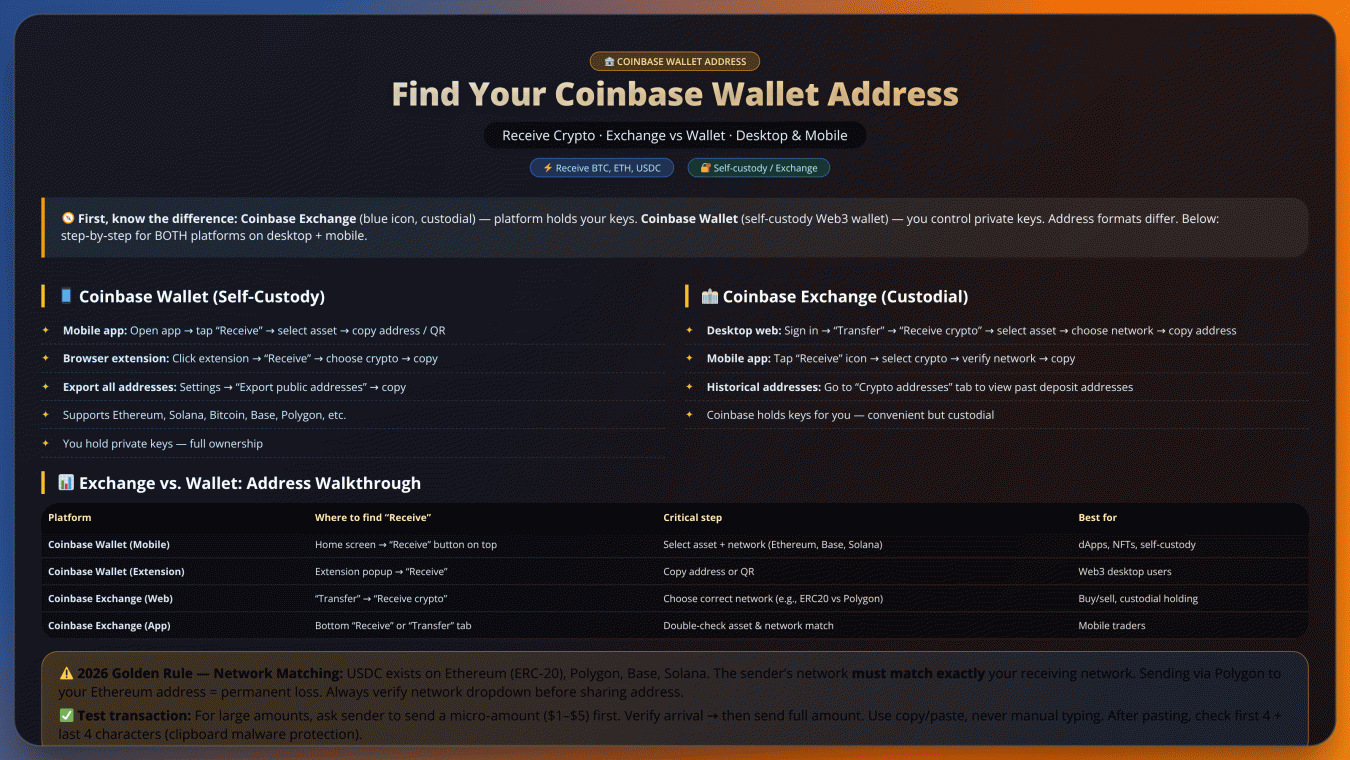
Understanding Coinbase vs. Coinbase Wallet
Before diving into the steps, it's crucial to distinguish between Coinbase and Coinbase Wallet, as they serve different purposes:
- Coinbase Exchange: The primary platform (blue icon) for buying, selling, and trading crypto. Coinbase holds your private keys.
- Coinbase Wallet: A self-custody Web3 wallet (black/blue icon or browser extension) where you control your private keys and interact with decentralized apps (dApps) like Ethereum, Solana, and Base.
Part 1: Finding Your Address in Coinbase Wallet (Self-Custody)
On Mobile (iOS & Android)
Finding your Coinbase Wallet address on mobile is easy. Start with Opening the Coinbase Wallet Application and registering yourself in it, either through Face ID or your fingerprint, PIN code. After logging in, it should bring up the main dashboard of objects where you will see a button to start "receiving". When you tap this, you'll be given a list of supported assets such as Bitcoin (BTC) and ethereum (ETH). When you choose your asset, the app creates a wallet address for you: a fairly long alphanumeric string followed by creating a QR code that can be shared. To make things even easier, tap the “Copy” icon to copy the address so it can be pasted on your clipboard or allow them scan directly from fellas QR code on their screen.
On Desktop (Browser Extension)
Desktop users begin by clicking the Coinbase Wallet extension in their browser's toolbar. Choose Receive from the extension interface at the top of your window. Next up, you'll have to select the coin type you would like to receive. The extension will show you your wallet address in text form, as well a QR code with that same information. This is an essential security check — Make sure the first four and last four characters of that address match what you've copied to mitigate against clipboard malware. Taking this simple verification step can protect your crypto assets from being misdirected away from their intended beneficiary.
Important note: All wallets create separate addresses for all supported blockchain networks, regardless of whether it is a mobile or desktop wallet (the address associated with your mobile coinbase and the other one on that device). You'll also have different addresses for assets on Ethereum compared to bitcoin transactions, e.g. Each network is clearly labelled on the interface, which can help avoid expensive mistakes that occur when funds are received into incorrect networks. This is why a lot of users bookmark their frequently used addresses and/or save them into secure notes for easy access when they are transacting.
Part 2: Locating Your Address on Coinbase Exchange
Accessing Your Wallet Address
To retrieve your wallet address through Coinbase's platforms, follow these platform-specific instructions:
Desktop Browser Method- Always cross-verify addresses before transactions
- Bookmark legitimate Coinbase domains to prevent phishing
- Regularly update your authentication methods
- Consider using hardware wallets for large balances
- Monitor transaction alerts for unauthorized activity
Remember that wallet addresses may periodically update for security reasons. Always check for the most current address before receiving funds, especially for recurring transactions.
2026 Security Checklist
In the rapidly evolving world of cryptocurrency, security remains paramount when receiving digital assets. The BTCC team emphasizes these critical best practices to safeguard your transactions:
- Network Matching is Non-Negotiable: With the proliferation of multi-chain assets (like USDC existing on Ethereum, Polygon, and Base networks), verifying identical networks between sender and receiver prevents irreversible losses. A 2025 CoinMarketCap report showed 23% of crypto losses resulted from cross-network transfers.
- Test Transaction Protocol: For amounts exceeding $1,000, initiate a micro-transfer of $1-$5 first. This verification step, while adding minor fees (typically $0.10-$3 on Ethereum according to TradingView gas metrics), prevents catastrophic errors. Institutional traders have adopted this as standard practice since 2024.
- Clipboard Vigilance: Malware targeting crypto users often manipulates copied addresses. After pasting, manually verify the first/last 4 characters against your wallet. The BTCC security team recommends using hardware wallets' built-in verification features when available.
- QR Code Advantages: Scanning addresses directly from your wallet app eliminates typing errors. Modern wallets like Coinbase now support animated QR codes for multi-network addresses.
- Time-Limited Addresses: Some exchanges now offer expiring deposit addresses - a feature worth enabling for added security against address reuse attacks.
Remember: Blockchain transactions are irreversible by design. While platforms like BTCC implement robust security measures, ultimate responsibility lies with users. Always double-check transaction details before confirming, and consider using exchange-native memo/tag fields when available for additional verification layers.
Why Do I Have Multiple Addresses?
Understanding cryptocurrency addresses requires recognizing they're fundamentally different from traditional bank account numbers. While your Coinbase Wallet manages multiple addresses behind the scenes, each serves specific technical purposes across different blockchain networks.
Technical Underpinnings of Address Diversity
The variation in addresses stems from core blockchain architecture:
- Consensus Mechanism Differences: Proof-of-Work (Bitcoin) and Proof-of-Stake (Ethereum) networks require different address validation methods
- Signature Schemes: ECDSA (Bitcoin) vs EdDSA (Solana) cryptographic approaches demand distinct address formats
- Smart Contract Compatibility: EVM-compatible chains share formats while non-EVM chains differ substantially
Operational Advantages
Multiple addresses enable sophisticated financial management:
Future-proofing Considerations
Emerging standards like ENS (Ethereum Name Service) and Bitcoin Taproot are creating new address types. Modern wallets automatically:
- Detect network upgrades
- Generate compatible addresses
- Warn about deprecated formats
When receiving assets, always confirm the sending platform supports the address format displayed in your wallet. Cross-chain bridges and wrapped tokens add complexity, making verification doubly important for non-native transfers.
Final Thoughts
Performing a cryptocurrency transaction is no walk in the park but requires more care because once an error occurs, there is no reverse. Follow this simple checklist before transferring your assets — Name tag for often used wallet addresses on the platform to avoid confusion and Scan QR Code instead of manually typing (as people can make manual typo mistakes). Develop verification system to validate address functionality by requiring senders to make a micro-transaction (most likely $1–$5) prior to doing full amounts.
You can also see the difference between custodial exchange services and self-custody wallets — one is managed on your behalf, while with another you take full responsibility. Enable all the security layers at your disposal; Two-factor authentication, IP whitelisting and alerts on new transactions. For multi-chain assets, be extra careful; even if its the same token (like USDC) you may end up losing funds forever since both going to and fro have to happen on a blockchain environment that is compatible with each other.
Maintain updated bookmarks to official platform resources and regularly review security settings. The decentralized nature of blockchain means transaction reversals are impossible, making preventive verification your primary defense against errors. This operational discipline ensures you benefit from cryptocurrency's advantages while mitigating its inherent risks.
FAQs
How do I find my Coinbase Wallet address on desktop?
Open the Coinbase Wallet browser extension, go to "Settings," click "Export public addresses," and copy the relevant address.
How do I find my Coinbase Wallet address on mobile?
Log in to the Coinbase Wallet app, tap "Receive," and copy the address for the desired asset.
Does Coinbase provide a wallet address?
Yes, Coinbase Wallet automatically generates addresses for supported blockchains upon account creation.
References:https://help.coinbase.com/en/coinbase/getting-started/crypto-education/where-is-my-crypto-address
https://supra.com/academy/how-to-find-your-coinbase-wallet-address/

Log in to Reply
Log in to comment your thoughtsComments
Related Articles
|Square
Get the BTCC app to start your crypto journey
Get started today Scan to join our 100M+ users