A Beginner’s Guide: What Is Phantom Wallet & How to Use It?

Phantom Wallet is a cryptocurrency wallet that allows users to manage their digital assets across multiple blockchains, including Solana, Ethereum and Bitcoin. Thanks to its intuitive interface and powerful features, it has become one of the most popular wallets among Solana users.
Whether you’re new to cryptocurrency or an experienced trader, Phantom Wallet offers a seamless experience for managing your assets, making transactions and interacting with decentralised applications (dApps). In this beginner’s guide, we’ll walk you through the essential aspects of Phantom Wallet, including its features, setup process, and effective use guidance.
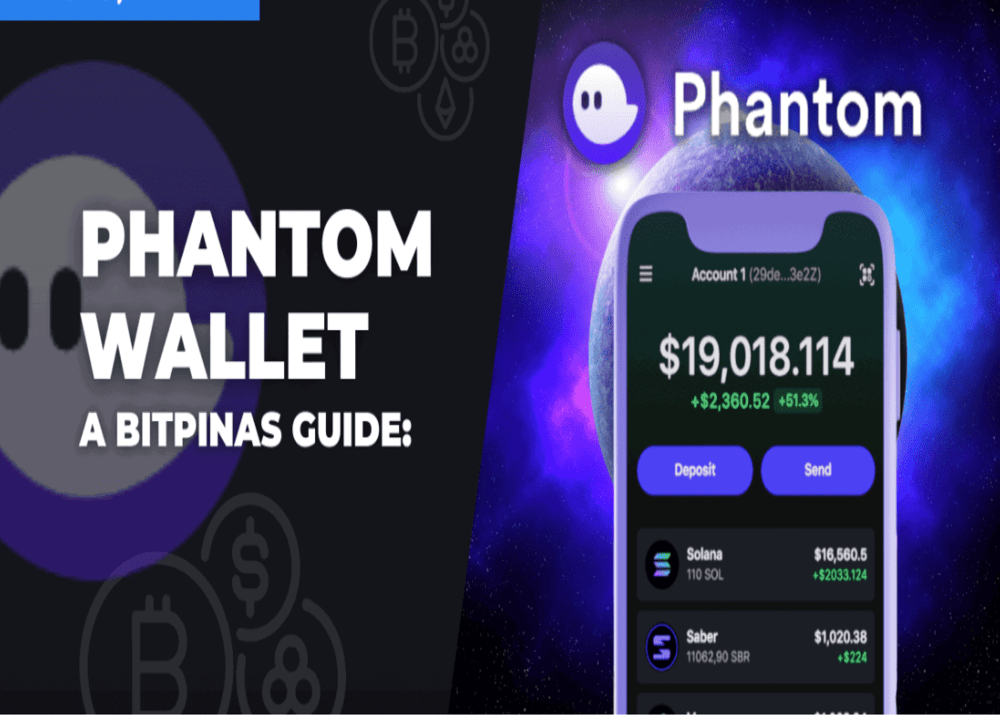
Table of Contents
- What is Phantom Wallet?
- Key Features of Phantom Wallet
- Phantom Wallet vs. Trust Wallet
- How to Set Up a Phantom Wallet: a Step-by-Step Guide
- How to Use Your Phantom Wallet?
- Conclusion
\Unlock Up To 30,000 USDT In Welcome Rewards!/
What is Phantom Wallet?
Phantom Wallet is a non-custodial cryptocurrency wallet. Since its launch, it has quickly risen to prominence and become a popular choice for users looking to interact with Solana’s fast, low-cost blockchain. It has also added support for other chains, such as Ethereum, Polygon, Base, Sui and Bitcoin.
Phantom Wallet serves as a gateway for users to manage their cryptocurrencies and non-fungible tokens (NFTs). Like other Web3 wallets, Phantom allows users to interact with decentralised finance (DeFi) platforms and applications (DApps).
As a non-custodial wallet, Phantom gives users full control over their private keys, meaning that only the wallet owner has access to their funds. This ensures privacy and security, making it a popular choice among crypto enthusiasts. Phantom is available as a browser extension compatible with Chrome, Firefox and Edge, as well as a mobile app for iOS and Android devices.
[TRADE_PLUGIN]BTCUSDT,ETHUSDT[/TRADE_PLUGIN]
Key Features of Phantom Wallet
Phantom stands out among other crypto wallets thanks to its wide range of features, which cater for both beginners and advanced users. Let’s take a look at some of these features:
Multi-chain support
While Phantom’s primary focus is Solana, it has expanded to support other blockchains such as Ethereum, Polygon, Bitcoin and Sui. This makes it a versatile option for crypto enthusiasts who aren’t tied to just one chain.
User-friendly interface
One of Phantom’s standout features is its sleek and intuitive interface. Setting up and navigating the wallet is straightforward, even for beginners. Whether you’re sending tokens or interacting with decentralised exchanges (DEXs), everything is just a few clicks away.
In-Built Swap Feature
Phantom Wallet comes with an integrated token swap feature, enabling users to exchange tokens directly from their wallet, eliminating the need for external exchanges. This makes trading simple and fast, providing a one-stop solution for crypto enthusiasts.
NFT & DeFi compatibility
Phantom supports Solana-based NFTs and integrates with Solana DeFi protocols, allowing users to participate in staking, liquidity pools, and yield farming, all from the wallet—or by connecting in the app website.
Security & privacy
As a non-custodial wallet, users can control their private keys, which are never shared or stored on a central server. Phantom also supports features such as hardware wallet integration and secure backups to help protect their funds against potential threats.
How to Set Up a Phantom Wallet: a Step-by-Step Guide
Getting started with the Phantom Wallet is simple and user-friendly. This guide focuses on setting up the Phantom Wallet browser extension, although the process is similar on mobile devices. The main difference on mobile devices is that you have the option of using biometric security, such as fingerprint or facial recognition. Follow these simple steps to set up your Phantom wallet:
1. Download the Wallet
Visit the official Phantom website to download the appropriate version for your device. As of press time, Phantom is available as a mobile app for both iOS and Android, as well as a browser extension for Chrome, Firefox, Brave, and Edge.
2. Create or Import a Wallet
Next, you can either create a new wallet or import an existing one. For this guide, we’ll be creating a new wallet.
3. Choose Wallet Setup Method
You can set up your wallet using either an email address or a seed phrase. We’ll demonstrate using a seed phrase for this example.
4. Set a Secure Password
Create a strong password for your wallet. This password will be used locally on your current device and browser profile.
If you’re using a mobile device, you’ll also have the option to enable biometric security (fingerprint or facial recognition) for added protection.
5. Safeguard Your Seed Phrase
Make sure to store your seed phrase in a secure and private location. This phrase is your master key and the only way to recover your wallet if needed. Never share it with anyone.
6. Wallet Setup Complete
That’s it! Your Phantom Wallet is now ready to use. You can start managing your digital assets securely and easily!
\Unlock Up To 30,000 USDT In Welcome Rewards!/
How to Use Your Phantom Wallet?
Phantom Wallet offers both basic and advanced features, making it easy to manage your digital assets. Once set up, navigating and using it is a seamless experience.
1) Adding Funds to Phantom Wallet
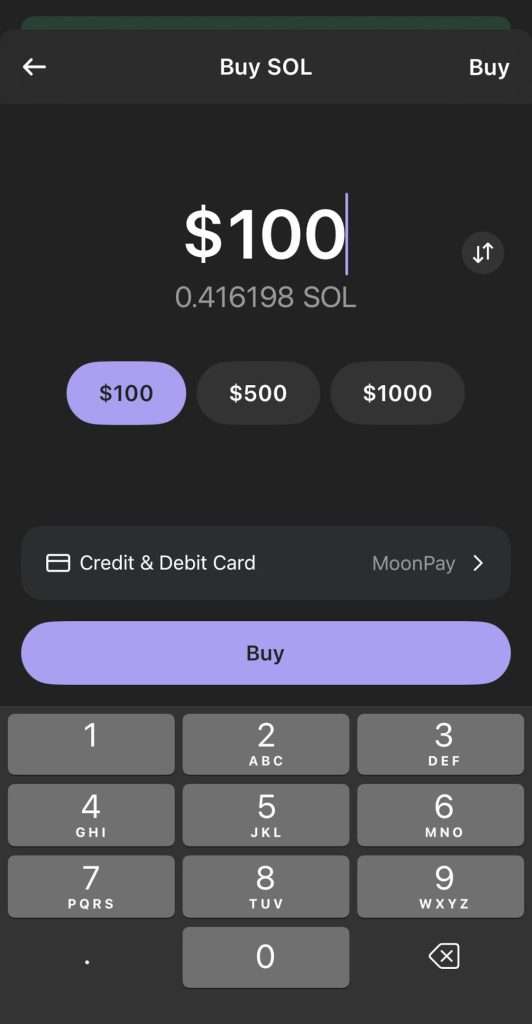
There are several ways to add funds to your Phantom wallet. The simplest method is to buy directly within the app:
- On the wallet home screen, click “Buy”.
- Select the cryptocurrency you wish to purchase, such as Solana (SOL), Ethereum (ETH), Polygon (MATIC), Bitcoin (BTC), USDC, and more.
- Enter the amount you want to purchase.
- Choose “Credit & Debit Card” to pay via card, Apple Pay, or your preferred payment method.
- For better rates and lower fees, select MoonPay as your payment provider.
- Click “Buy” and follow the instructions in the MoonPay widget to complete your transaction.
If you’d prefer to add funds by receiving assets from another wallet or through swaps, keep reading for further options.
2) Sending & Receiving Crypto
Phantom Wallet makes it simple to send and receive SOL and other supported cryptocurrencies.
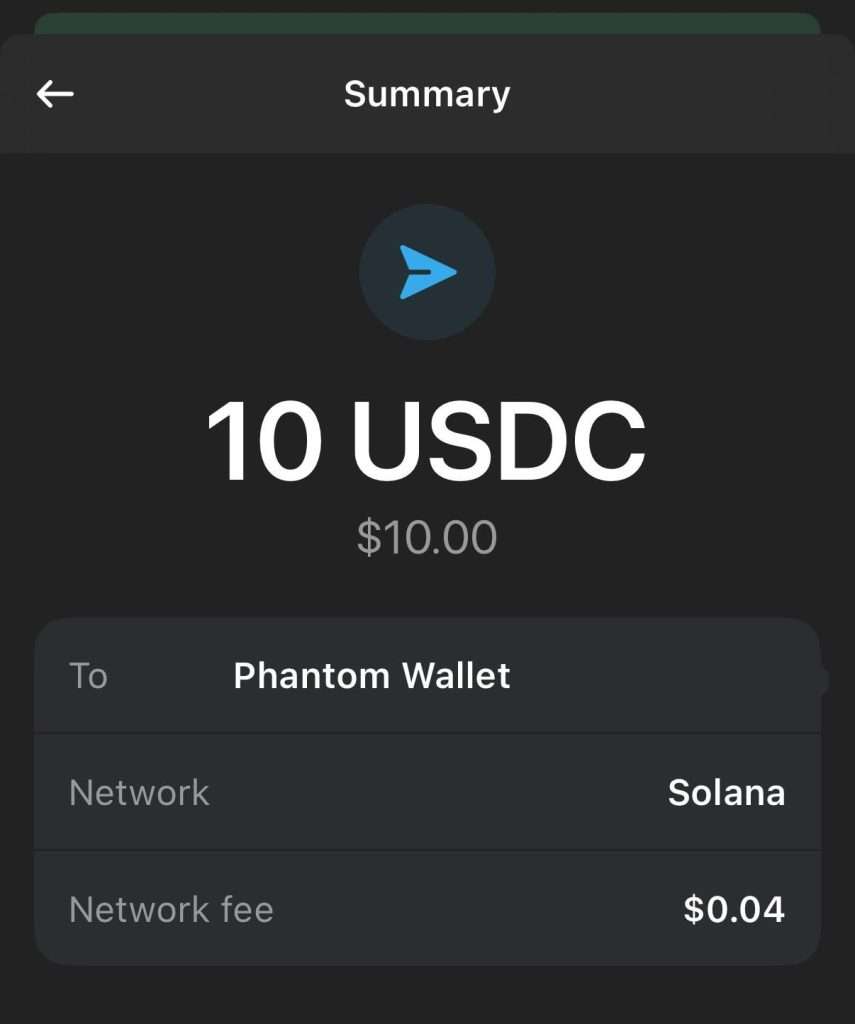
To Send Crypto
- Click the “Send” button on your home screen.
- Select the token you wish to send (Alternatively, click on the asset directly from your home screen and press “Send”).
- Enter the recipient’s wallet address (You can either paste the address or select one of your linked Phantom accounts for quicker transfers).
- Specify the amount of crypto you want to send, then click “Next”.
- Review the transaction details and click “Send” to complete the process.
To Receive Crypto
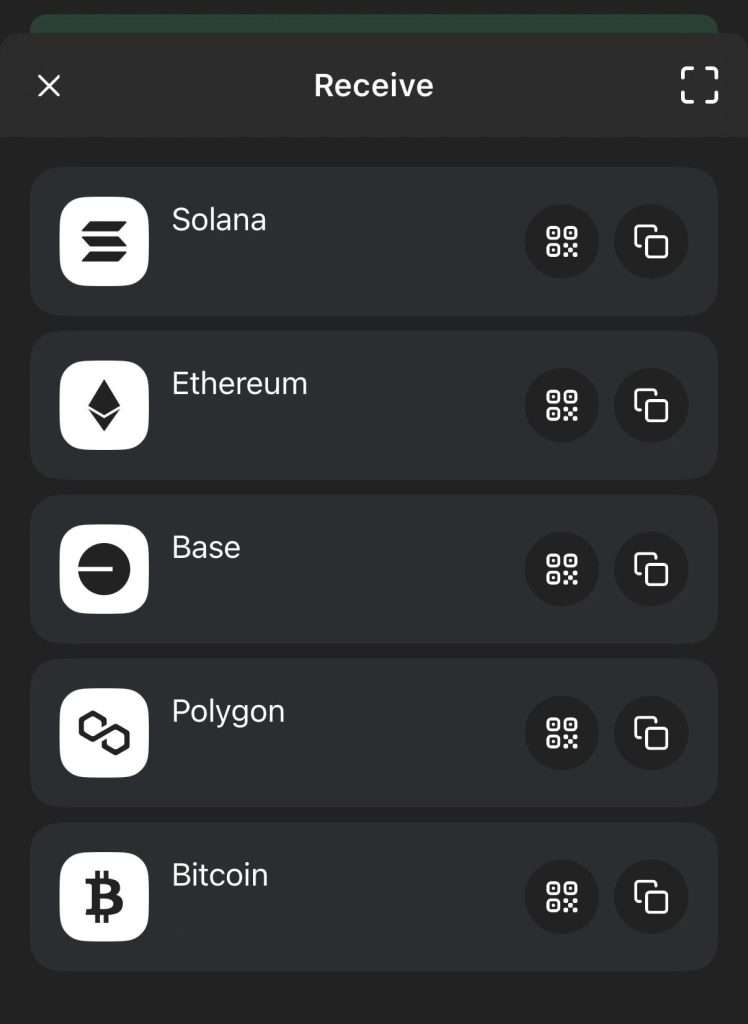
- Click “Receive” on your wallet home screen.
- Choose the asset you want to receive (Alternatively, click the asset from your home screen and press “Receive”).
- Select either “QR Code” or “Copy Address” to generate your wallet address.
- Share the QR code or wallet address with the sender to receive crypto into your wallet.
3) Swapping Tokens in Phantom Wallet
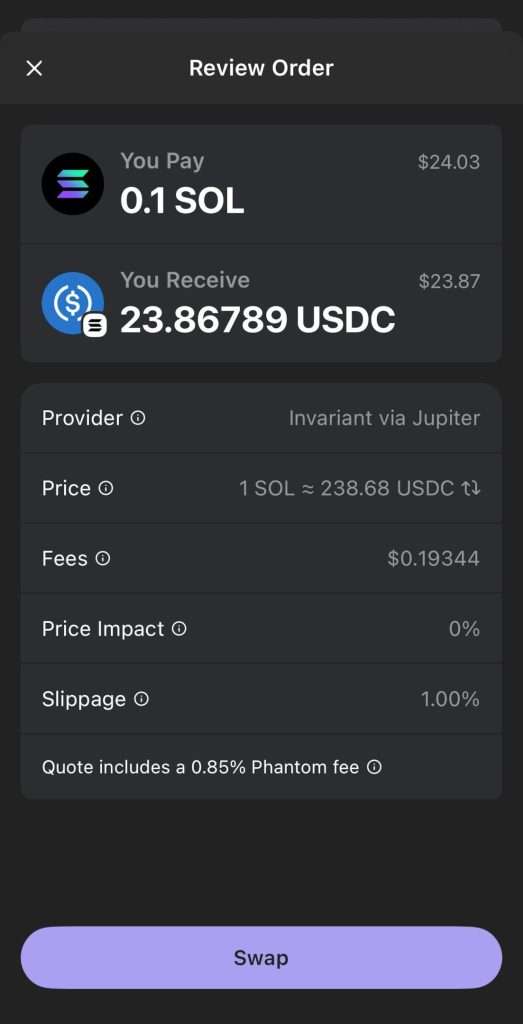
- Phantom Wallet includes a built-in token swap feature that lets you acquire other cryptocurrencies directly from the wallet:
- Open your Phantom Wallet and select “Swap”.
- Choose the tokens you want to swap.
- Enter the amount (either the amount to pay or the amount to receive).
- Click “Review Order” to check transaction details, including price, fees, and slippage.
- Once satisfied, click “Swap” to complete the transaction.
4) Managing NFTs in Phantom Wallet
- Phantom Wallet is an excellent platform to manage your Solana-based NFTs:
- Open Phantom Wallet and navigate to the “NFT” section (the second tab, represented by four squares).
- Here, you can view any NFTs in your collection, send them to another wallet, list them on NFT marketplaces like Magic Eden, or quickly sell them with just one click.
5) Connecting Phantom Wallet to dApps
- Phantom Wallet seamlessly integrates with decentralized applications (dApps) on the Solana network:
- Visit the dApp of your choice, whether on mobile or desktop.
- Click “Connect Wallet”.
- Choose Phantom Wallet from the list of supported wallets.
- Approve the connection, and you’re ready to interact with the dApp.
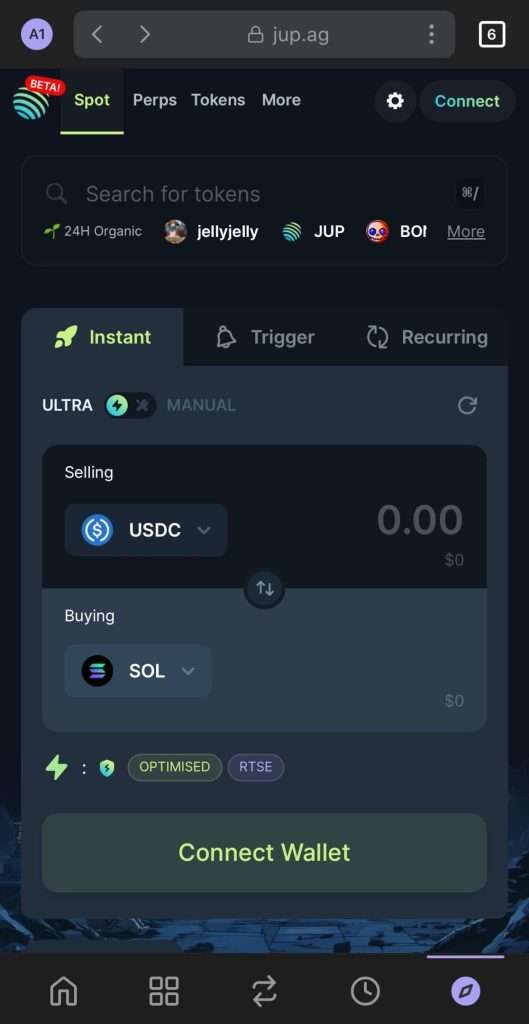
Alternatively, you can use Phantom’s Explore tab (the last tab option) to connect directly to dApps from within your wallet app.
[TRADE_PLUGIN]BTCUSDT,SOLUSDT[/TRADE_PLUGIN]
Conclusion
Phantom Wallet is an excellent choice for users who want a simple yet powerful wallet for managing Solana-based assets. With its clean interface, security features, and support for NFTs and staking, Phantom provides a complete solution for anyone looking to interact with the Solana blockchain. Whether you’re a beginner or an experienced user, Phantom makes it easy to get started in the crypto world while ensuring your assets remain secure.
Setting up and using Phantom is quick, even if you’re new to crypto. Just remember to keep your seed phrase safe, stay cautious with unknown tokens and DApps, and regularly update your wallet app to stay ahead of security threats.
\Unlock Up To 30,000 USDT In Welcome Rewards!/
About BTCC
BTCC is a trusted and well-respected exchange in the world thanks to its unwavering commitment to security and transparency. Since its establishment in 2011, BTCC has boasted an impeccable security track record, with zero reported hacks or breaches. Holding licenses in the U.S., Canada, and Europe, BTCC provides a comprehensive suite of trading features within a secure and regulated platform.
With a mission of providing a trading platform that is fair and reliable in every sense, the BTCC platform supports spot trading for over 360 cryptocurrencies, crypto futures trading with leverage up to 500x, crypto copy trading that allows users to follow experienced traders, demo trading accounts pre-loaded with $100,000 in virtual funds, and tokenized futures for stocks and commodities. If you want to engage in cryptocurrency trading, you can start by signing up for BTCC.

BTCC Benefits ⇓
BTCC offers a sign-up bonus for new users. Register now and start trading to receive your welcome rewards of up to 30,000 USDT. Additionally, VIP members can enjoy more benefits. Please note that your VIP level will increase based on your deposit amount. The more you deposit, the higher your level will be.
BTCC is among the best and safest platforms to trade cryptos in the world. The reasons why we introduce BTCC for you summarize as below:
- Industry-leading Security
- High Leverage Of Up To 500x
- High Liquidity & Volume
- Extremely Low Fees
- High and Rich Bonus (up to 30,000 USDT)
- Excellent Customer Service
\Unlock Up To 30,000 USDT In Welcome Rewards!/
BTCC Guide:
Understanding KYC In Crypto: How To Complete KYC On BTCC
How to Earn Your 10,055 USDT Welcome Bonus on BTCC: A Complete Guide To Maximize Your Crypto Return
Why Choose BTCC Futures: A Comprehensive Guide For All Traders
A Beginner’s Guide: What Is Copy Trading & How To Start Copy Trading On BTCC
How to Use BTCC Demo Trading: A Step-By-Step Guide For Beginners In 2026
BTCC Referral Code 2026: Inviting Friends To Sign Up On BTCC
Crypto Investing Guide:
What Is USOR Crypto: Everything You Need To Know
Best Sign-Up Bonus Instant Withdraw No Deposit Crypto Apps 2026
Best Crypto Exchanges Offering Free Sign-Up Bonus 2026: No Deposit Required!
Best Non KYC Crypto Exchanges In 2026
Top Free Bitcoin Mining Apps & Cloud Mining Platforms For Effortless BTC Earnings In 2026
How To Maximize You Investment Return With Investiit.com Tips: A Complete Guide For Users In 2026
Investing.com Review: A Full Guide For Users In 2026
Paisaperreels Full Review 2026: Is It Legit or Scam?
Binozy Review: Is Binozy.com Legit or Scam?
Inevitrade Review 2026: A Full Guide For Users
Scrooge Casino Login: A Useful Guide For Beginners In 2026
Best Free Bitcoin Accelerators 2026
How To Get Free Monkey Coin From Telegram Monkey App: A Comprehensive Guide In 2026
What Is eCryptobit.com Invest: A Comprehensive Review & Investment Guide In 2026
What is Etherions.com Tech: Something You Need To Know About It
What Is SUV Bitcoin Miner APK: Everything You Need To Know About It
What Is Webtoon XYZ: Everything You Need To Know About It
What Is Sxx Value 2022 Calculator: Everything You Need to Know About It
What Is Sxx Sxy Syy Calculator: Everything You Need To Know About It
What Is SUV Bitcoin Miner APK: Everything You Need To Know About It
What Is OrbiMount: Everything You Need To Know About It
5StarsStocks.com Platform Review 2026: A Comprehensive Guide For Users
Who Is Sondra Blust: How Does She Start a Successful Path Through Crypto Trading?
What Is Crypto30x.com ASX: Everything You Need To Know About It
How To Mine Bitcoin: A Comprehensive Guide For Beginners In 2026
How To Withdraw Funds From Binance Australia: A Useful Guide In 2026
Best Cryptos To Mine In 2026: A Complete Guide For Beginners
How to Earn Free Cryptos: A Comprehensive Guide For Beginners In 2026
Best Crypto & Bitcoin Casinos Australia 2026
Top Crypto & Bitcoin Casinos Canada 2026
Best Crypto Wallets Australia 2026: Top & Secure Picks!
Best Crypto Trading Bots Australia 2026
Best Free Crypto Sign-Up Bonus Australia 2026
Bitgert (BRISE) Price Prediction & Forecast 2026 – 2050: Will Bitgert Hit $0.10?
Top Free Bitcoin Mining Apps & Cloud Mining Platforms For Effortless BTC Earnings In 2026
How To Mine Bitcoin: A Comprehensive Guide For Beginners In 2026
Best Crypto Exchanges Australia 2026
Buy Bitcoin (BTC) Australia: A Comprehensive Guide For 2026
Coinbase vs. CoinSpot: Which Is A Better Crypto Trading Platform For Australian Traders In 2026?
Understanding KYC In Crypto: How To Complete KYC On BTCC
A Beginner’s Guide: What Is Copy Trading & How To Start Copy Trading On BTCC
How To Buy Meme Coins In Australia – A Beginner’s Guide For 2026
Zucoin Price Prediction: Is Zucoin A Good Investment In 2026?
Please be aware that all investments involve risk, including the potential loss of part or all of your invested capital. Past performance is not indicative of future results. You should ensure that you fully understand the risks involved and consider seeking independent professional advice suited to your individual circumstances before making any decision.
For any inquiries or feedback regarding this article, please contact us at: [email protected]